Image: Shixart1985 / Wikimedia Commons (CC BY 2.0)
When you run a business alone, every tool you adopt is effectively an employee. It either takes work off your plate or quietly adds to it. Most solo founders do not struggle because they lack software. They struggle because they have collected a dozen apps with overlapping jobs, three places where client notes might live, and no clear idea of which subscription is doing what.
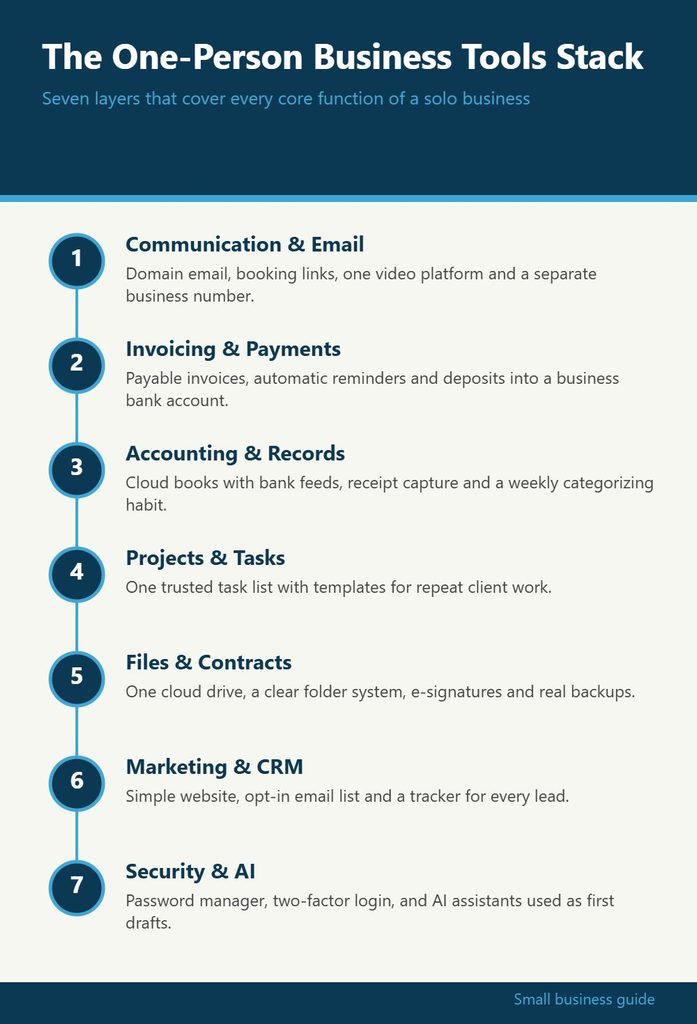
A good stack for a one-person business is small, connected and boring in the best sense. It covers the core functions of a company, from getting paid to keeping records, without requiring you to become a part-time systems administrator. The infographic below maps those functions into seven layers. The rest of this article walks through each layer, what it needs to do, how to choose a tool for it, and where solo operators tend to go wrong.
1. Communication and Email: Your Front Door
Email is still the official channel for most business relationships. Contracts get sent there, invoices get questioned there, and new clients usually make first contact there. That makes it the first layer to get right.
The most important upgrade is moving off a personal address and onto an address at your own domain. A domain-based address costs little through the major business email providers and signals that you are an established operation rather than a side project. It also means you own the address. If you ever switch providers, the address stays with you.
Beyond the inbox itself, think about these pieces:
- A shared calendar with booking links. A scheduling tool that lets clients pick an open slot removes the back-and-forth that eats twenty minutes per meeting.
- Video calls. Pick one platform as your default and put the link in your booking confirmation so nobody is hunting for it.
- A separate business phone number. Many solo owners use a virtual number app on their existing phone so they can silence work calls after hours.
The common mistake here is running client communication across email, text, social messages and a chat app all at once. Pick one or two official channels and tell clients where to reach you. Consistency protects you when you need to find what was agreed.
2. Money In: Invoicing and Payments
A business that cannot collect money easily is a hobby with paperwork. Your payments layer should let a customer pay you in the way they prefer, ideally by card or bank transfer from a link inside the invoice.
Most accounting tools include invoicing, and many payment processors include basic invoicing too. For a solo business, the simplest setup is usually invoicing inside your accounting software with a connected payment processor. That way, when a client pays, the payment is matched to the invoice automatically and you do not have to reconcile it by hand later.
Features worth looking for:
- Automatic payment reminders that go out before and after the due date
- Recurring invoices for retainer clients
- Deposits or partial payments for larger projects
- Clear records of processing fees, since those are typically a business expense
Make sure all of this flows into a dedicated business bank account. Mixing business payments into a personal account is one of the fastest ways to create a mess at tax time, and it can weaken the liability protection of an LLC or corporation. If you have not opened one yet, do that before you configure anything else in this layer.
3. Money Out and Records: Accounting and Bookkeeping
Accounting software is the spine of your stack. It is where income, expenses and receipts come together into numbers you can actually use: profit, cash on hand, what you owe in taxes, and which clients are worth keeping.
For a one-person business, choose a cloud accounting tool that connects directly to your business bank account and card. Bank feeds pull in transactions daily, and you simply categorize them. Set aside a recurring time, even fifteen minutes on Friday, to clear the queue. Bookkeeping done weekly is a chore. Bookkeeping done once a year is a crisis.
Pair accounting with a receipt capture method. Many apps let you photograph a receipt and attach it to the matching transaction. Digital copies are generally acceptable for record-keeping, but rules vary, so ask your accountant what your jurisdiction expects and how long to keep records.
If you are still deciding between tools, independent comparisons help more than vendor marketing. GrowBizLab publishes practical guides on accounting software, business bank accounts and tax deductions for small operators, and you can start here to see how the options compare for a solo setup.
4. Work Management: Projects and Tasks
When you are the only person in the business, it is tempting to keep your to-do list in your head. That works until you have four active clients, two proposals out and a tax deadline approaching. A work management tool externalizes that load.
You do not need enterprise project management software. What you need is one trusted place where every commitment lands. Look for:
- Simple views. A list view for daily tasks and a board view for tracking client projects through stages like “proposal,” “in progress” and “invoiced.”
- Due dates and reminders that reach you on your phone.
- Templates for repeat work, such as a client onboarding checklist or a monthly reporting routine.
- Quick capture, so a stray idea or request can be logged in seconds.
A practical example: a freelance designer might create a project template with every step from discovery call to final file delivery. Each new client becomes a copy of that template, with dates adjusted. Nothing gets forgotten, and the designer can see at a glance which projects are waiting on the client versus waiting on her.
The trap in this layer is over-engineering. If you spend more time organizing tasks than doing them, simplify. A tool you open every day beats a sophisticated one you avoid.
5. Files, Documents and Contracts
Your documents layer holds the paper trail of the business: contracts, proposals, deliverables, tax documents and brand assets. The goal is that you could find any important file in under a minute, from any device.
Use a single cloud storage service and create a consistent folder structure. One approach that works well for service businesses:
- Admin (formation documents, licenses, insurance policies, bank statements)
- Finance (tax returns, year-end reports, receipts by year)
- Clients (one folder per client, with subfolders for contracts, deliverables and correspondence)
- Marketing (logos, templates, portfolio pieces)
- Templates (contract, proposal, invoice and email templates)
Add an electronic signature tool for contracts. Getting agreements signed digitally is faster, creates a time-stamped record, and removes the excuse of “I haven’t had a chance to print it.” Keep your contract templates reviewed by a lawyer who knows your industry, then reuse them rather than drafting from scratch each time.
Backups matter more than most solo owners realize. Cloud storage syncs files, but syncing is not the same as backing up. If a file is deleted or corrupted, the sync may happily replicate that problem. Turn on version history and consider a second, independent backup for critical records.
6. Marketing and Customer Relationships
A one-person business lives or dies by its pipeline. The marketing layer covers how people find you and how you keep track of them once they do.
At minimum, you need:
- A simple website with clear service descriptions, proof of work and a way to contact you. A website builder is usually enough for solo businesses.
- An email marketing tool if you plan to send newsletters or updates. Your email list is an asset you control, unlike social media followers.
- A lightweight CRM or contact tracker. This can be a dedicated CRM with a free tier or even a well-structured spreadsheet. What matters is logging every lead, when you last spoke, and the next step.
The most expensive marketing mistake is not a bad ad. It is the warm lead who emailed three weeks ago and never got a follow-up because the message sank in the inbox. A CRM, even a basic one, fixes that. Set a weekly reminder to review open leads and send follow-ups.
Be careful with the data you collect. Email marketing and contact data are subject to privacy and anti-spam rules that differ between countries. Use opt-in forms, include an unsubscribe link, and check the rules that apply to your audience.
7. Security, Backups and AI Assistants
The final layer protects everything else and, increasingly, speeds it up. For a solo business, a single compromised email account can expose client data, redirect payments and lock you out of every other tool, because password resets flow through email.
Core security habits for a one-person stack:
- Use a password manager and unique passwords for every service.
- Turn on two-factor authentication everywhere it is offered, starting with email, banking and accounting.
- Keep devices updated and use full-disk encryption on laptops.
- Store recovery codes somewhere safe and offline.
AI tools have become a practical addition to this layer. Many solo owners now use an AI writing assistant to draft emails and proposals, summarize meeting notes, or brainstorm marketing copy. Others rely on built-in AI features inside their accounting or project tools. Treat AI output as a first draft. Check facts, especially anything involving numbers, legal terms or client commitments, and avoid pasting confidential client information into tools whose data policies you have not reviewed.
Before adding any new AI tool, read the vendor’s own documentation on data handling. The vendor’s official website is not the only place to research, though: GrowBizLab covers AI tools and software for small businesses in plain language, which makes it easier to judge whether a product fits a solo operation before you commit to a subscription.
How to Put the Stack Together Without Overspending
Seven layers can sound like seven subscriptions. In practice, many tools cover more than one layer. An office suite might handle email, calendar, documents and video calls. Accounting software often covers invoicing and payments. A few principles keep costs in check:
- Start with the free or entry tier and upgrade only when you hit a real limit, not an imagined one.
- Prefer tools that integrate natively with your accounting software and email. Every manual copy-paste between systems is a future error.
- Audit subscriptions quarterly. Look at your card statements and cancel anything you have not used in the past month.
- Write down your stack. A one-page document listing each tool, what it does, its cost and its renewal date makes audits fast and helps if you ever hire help.
Software subscriptions used for the business are often deductible as business expenses, but the treatment depends on your location and business structure. Keep receipts and confirm the details with a tax professional.
Common Mistakes Solo Owners Make With Their Stack
Looking across the layers, a few patterns cause most of the pain:
- Tool hopping. Switching project apps every few months means rebuilding systems instead of doing paid work. Commit to a tool for at least a quarter.
- No single source of truth. If client details live in email, a notes app and a spreadsheet, none of them is reliable.
- Skipping security until something breaks. Two-factor authentication takes minutes to set up and can save weeks of recovery.
- Buying for the business you hope to have. Enterprise features are wasted on a one-person company. Buy for the next twelve months, not the next five years.
A lean, connected stack frees your attention for the work only you can do. Review it once a quarter, cut what you do not use, and let each tool earn its place the way a good hire would.