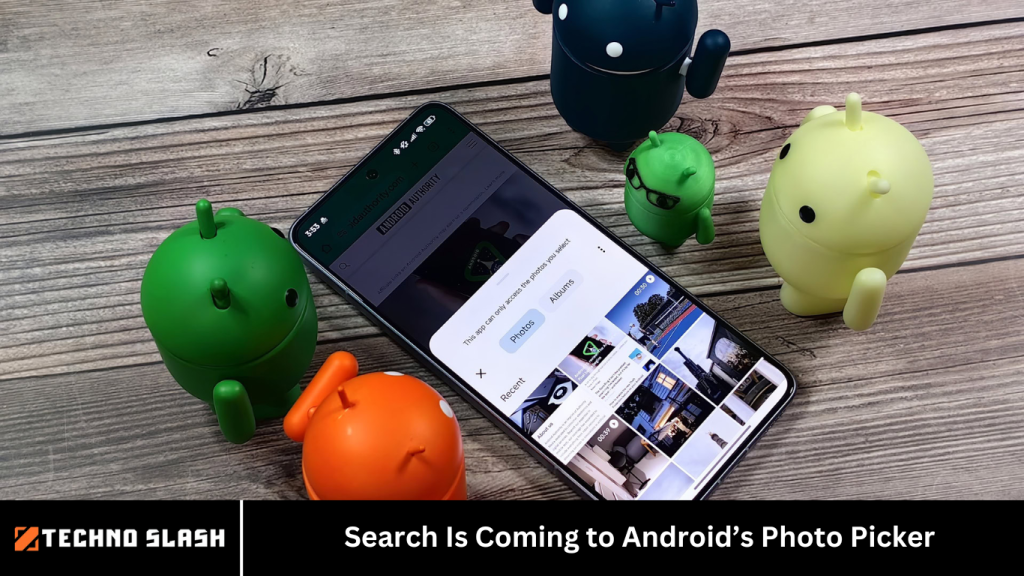
Android users know the frustration all too well — scrolling endlessly through thousands of photos just to find the one image they want to upload, share, or attach. While Google Photos makes finding pictures easy thanks to its powerful search features, that same convenience has long been missing from one core Android feature: the Photo Picker.
That’s about to change. Search is coming to Android’s Photo Picker, finally bringing a long-requested feature to the native Android photo selection interface. In this article, we’ll break down what the Android Photo Picker is, why search support matters, what Google has said about the rollout, and when users can expect the feature to arrive.
Whether you’re a developer, tech enthusiast, or everyday Android user, here’s your complete guide to this significant update.
More Read: Disney is Creating the Ultimate Streaming App
📸 What Is Android’s Photo Picker?
Introduced in Android 13, the Photo Picker is a privacy-focused system tool that allows users to select specific photos or videos to share with an app — without granting that app full access to their entire media library.
Key features of the Photo Picker:
- Lets users choose specific media items (photos/videos)
- Prevents apps from requesting broad file access permissions
- Integrated with both local storage and cloud services (like Google Photos)
- Provides a consistent media selection interface across all apps
The Photo Picker aims to strike a balance between user privacy and developer convenience, and it’s part of Google’s broader push to improve permissions management on Android.
However, up until now, one key feature has been sorely missing: search functionality.
🔍 Why the Lack of Search in the Photo Picker Was a Problem
For users with thousands of images stored on their devices or in cloud services like Google Photos, browsing manually through the Android Photo Picker can be extremely time-consuming.
Without a search bar, users had to:
- Scroll manually to find a photo or video
- Navigate by date with limited filtering options
- Hope the desired media was recent enough to be easily accessible
This stood in sharp contrast to the Google Photos app, which has long offered best-in-class media search powered by Google’s image recognition and cloud indexing. Being unable to search within the Photo Picker meant users often had to exit the app they were using, find the image in Google Photos, and then return.
🆕 Google Announces Photo Picker Search Support
In May 2024, Google confirmed what Android fans had long hoped for: search support was officially coming to the Android Photo Picker. This announcement was part of a broader update to Google Play system components, which handle much of Android’s modular, updatable features outside of traditional OS updates.
According to Google, the update would bring:
- Search capabilities to the Photo Picker
- Support for both local and cloud-based searches
- Compatibility with multiple Android versions, not just Android 14 or 15
This was a major change — one that promised to dramatically improve the media-sharing experience across all Android apps.
⚠️ Delays in the Rollout: What Happened?
Despite the announcement in 2024, the search feature didn’t arrive as expected. As of early 2025, there had been:
- No official release timeline
- No public screenshots or demos from Google
- No documented changes in Android developer materials
This led to frustration among users and developers who had been eagerly awaiting the feature. Some speculated that it was delayed for UX refinements, cloud integration complexities, or backend rollout issues with Google Play Services.
✅ Feature Spotted in the Wild: Search in Action
Fast forward to May 2025, and we finally have proof that the feature is actively rolling out behind the scenes. Android Authority contributor Kamila Wojciechowska confirmed that Photo Picker search is live on her device.
Here’s how it works:
- A search bar appears at the top of the Android Photo Picker
- Users can type keywords (e.g., “beach,” “birthday,” “cat”) and hit enter
- The picker displays filtered results from both local and Google Photos media
- Images and videos can be selected directly from the results and shared with the app in use
This simple but powerful addition finally brings Google’s search intelligence into the native media picker.
📱 Is Photo Picker Search Tied to Android 16?
No. One of the most encouraging aspects of this rollout is that the search feature is not dependent on Android 16 or any specific OS version. Instead, it appears to be tied to:
- Google Play system updates
- Google Photos app updates
- MediaProvider and PickerProvider modules
That means it can roll out to any Android device running Android 13 or newer, regardless of the manufacturer or OS skin (e.g., Samsung One UI, Pixel UI, etc.).
⚙️ How Developers Can Prepare
For developers who rely on the Android Photo Picker via the PhotoPicker API, no changes are required to enable the new search feature. Since the search bar is built into the system UI, it’s automatically included for all apps using the native picker interface.
Best practices for developers:
- Use the
PhotoPicker.launchPicker()method for media selection - Avoid using custom file pickers unless necessary for compatibility
- Ensure your app has the latest SDK dependencies to benefit from improvements
If your app already uses the native Photo Picker, the search bar will appear automatically once it’s available on the device.
🔐 Privacy and Permissions: Is Search Still Private?
Yes. The addition of search to the Android Photo Picker does not compromise user privacy. In fact, it continues to reinforce Android’s privacy-first design:
- Apps can only access the media files the user explicitly selects
- Search is performed locally and within the user’s own Google Photos account
- No additional permissions are granted to third-party apps
This means users can enjoy better usability without sacrificing control over their data.
💡 Why This Feature Matters
The inclusion of search in Android’s Photo Picker is a quality-of-life upgrade that reflects Google’s evolving focus on privacy, usability, and user empowerment. Here’s why it’s important:
For Users:
- Makes it easy to find and share the right image or video quickly
- Reduces reliance on third-party apps or workarounds
- Improves productivity and convenience in messaging, productivity, and social apps
For Developers:
- Simplifies user experience within apps
- Reduces need to build or maintain custom pickers
- Aligns with Android’s official guidelines and best practices
For Google:
- Reinforces Android’s competitive edge in user experience
- Shows commitment to modular, updatable system components
- Responds directly to user feedback
🗓️ When Will It Be Available for Everyone?
As of May 2025, the feature appears to be rolling out gradually. While some users (like Kamila Wojciechowska) already have it enabled, many others do not.
Here’s what we know:
- Search support is baked into recent Google Play system updates
- It may require a combination of MediaProvider, Google Photos, and Google Play services updates
- Rollout may be server-side controlled, meaning Google is enabling it selectively
- There’s no official public timeline for full availability
If you don’t see the search bar yet, make sure to:
- Update your Google Photos app
- Install the latest Google Play system update
- Restart your device
- Wait for the feature to be enabled server-side
📈 SEO Summary: What You Need to Know
- Search in Android’s Photo Picker is one of the most requested Android features.
- Google is rolling out search support for media selection via system updates.
- No OS upgrade is required — works on Android 13+.
- The feature is live on some devices and may go global soon.
- User privacy is fully maintained with limited app access to selected files only.
- Developers benefit without needing to make changes in their apps.
Frequently Asked Question
What is Android’s Photo Picker?
Android’s Photo Picker is a built-in system tool introduced in Android 13 that lets users select specific photos or videos to share with apps, without giving those apps full access to their media library. It’s designed to be a more private and secure way to handle media sharing.
Why is search support in the Photo Picker a big deal?
Until now, users had to scroll manually through their photo libraries to find the right image or video. Adding a search bar lets users quickly find content by typing keywords, saving time and making the sharing experience far more efficient.
When will the search feature in Photo Picker be available?
There’s no official global release date yet, but as of May 2025, the feature has started appearing on some devices. It’s likely rolling out gradually via Google Play system updates and server-side activation.
Will the search feature work with Google Photos?
Yes. The new Photo Picker search will support both local device storage and cloud libraries, including Google Photos, making it easier to find any photo or video synced to your account.
Do I need Android 16 to get this feature?
No. The search function is not tied to Android 16. It’s part of modular system components updated through Google Play system updates, so it will work on Android 13 and above, depending on device compatibility.
Do I need to update anything to get the feature?
Make sure your device has the latest versions of:
- Google Photos
- Google Play services
- Google Play system updates
Even then, the search bar may not appear until it’s enabled on the server side by Google.
Will third-party apps have access to all my search results?
No. Apps can only access the media files you explicitly select. The search function runs within the system UI and maintains Android’s privacy-first design — your full photo library remains protected.
Conclusion
The ability to search within the Android Photo Picker may seem like a small addition, but it’s a significant leap forward in usability. It eliminates one of the last remaining gaps in the Android sharing experience and brings the platform in line with the search-first philosophy that defines Google’s software. Whether you’re trying to upload a receipt, attach a memory, or share a screenshot, finding the right image is now faster and smarter — just the way it should be.